
For macOS · Version 1.0
Subversion, right in Finder.
Status badges on every file, every SVN command a right-click away and WordPress releases in one click. No Terminal, nothing to install.
Free download · 14-day free trial of Pro · macOS 13+ · Mac with Apple silicon
- Subversion built in – no Homebrew, no Terminal
- Buy once – no subscription
- No data collection – no account, no tracking
That simple
Up and running in two minutes.
-
01
Download
Free from the Mac App Store. Subversion is built in – nothing else to install.
-
02
Set up
The assistant enables the Finder extension and checks out all your projects in one go.
-
03
Get going
Right-click any folder: update, commit, log or WordPress release – done.
Status badges
See what’s going on at a glance.
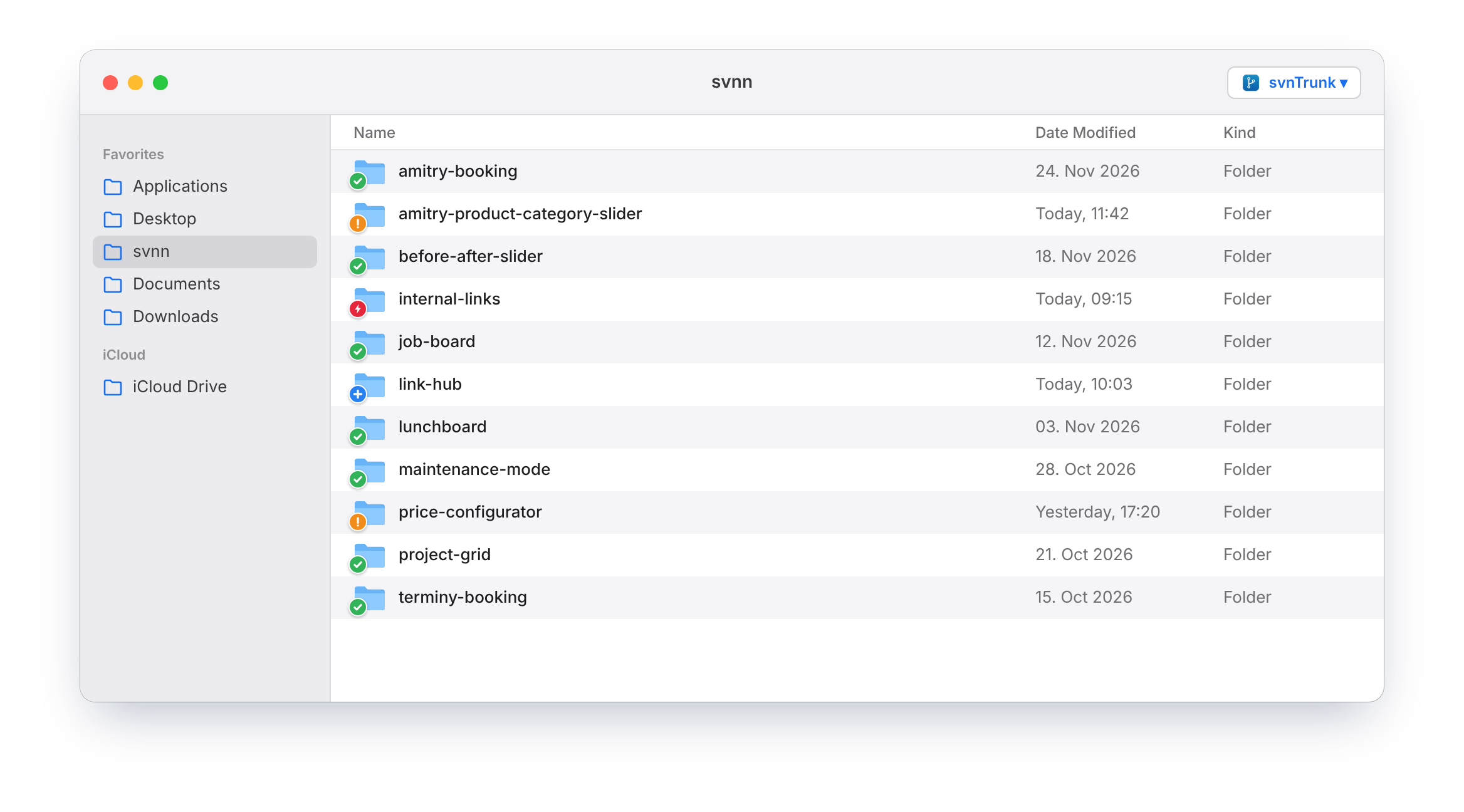
Green is committed, orange modified, blue added, red in conflict. Badges appear on every file and bubble up to parent folders – so you find every change without searching.
- amitry-booking
- readme.txt
- assets/datepicker.js
- includes/class-calendar.php
- languages/de_DE.po
- Committed
- Modified
- Added
- Conflict

Right-click
Every command where you work.
Update, commit, log, diff, revert and lock live in Finder’s context menu and toolbar.
Commit
Commit in seconds.
Pick files, write a message, done. Past messages are one click away, and checks catch empty messages, huge files and forgotten conflict markers.


WordPress · Pro
Plugin releases in one click.
The release assistant checks “Stable tag” and the plugin version, bumps both, commits trunk and creates the tag. WordPress.org ships the new version a few minutes later.
- Detects readme.txt and plugin header automatically
- Warns if the tag already exists
- Tag is copied server-side – fast, even for large plugins
Setup
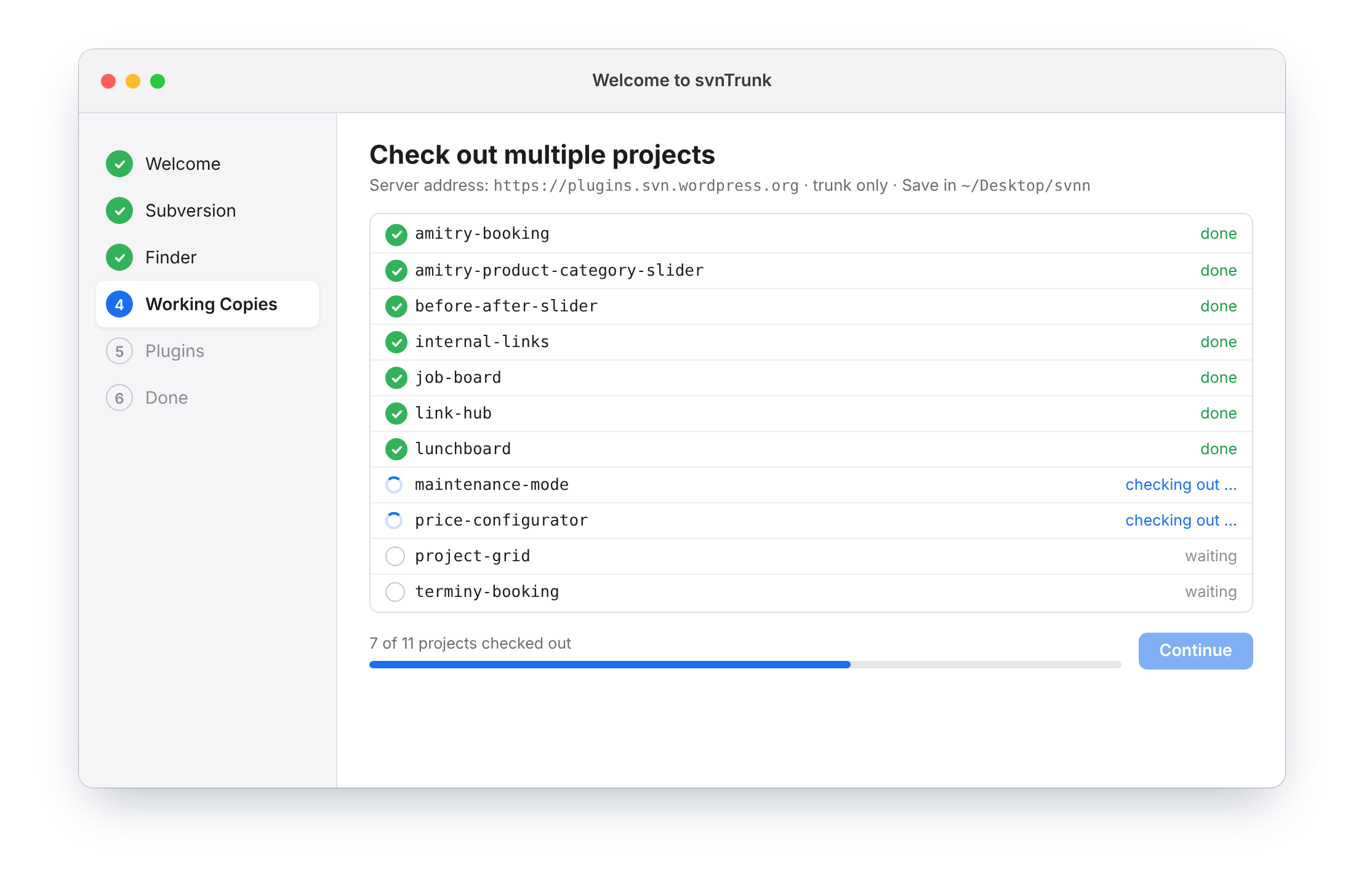
Check out all projects at once.
The assistant guides you through setup and checks out as many projects as you like in one go – one per line, a name is enough.
Features
Everything you need for SVN on the Mac.
-
Status badges in Finder
See at a glance what’s committed, modified, added or in conflict – even on parent folders.
-
Everything via right-click
Update, commit, log, diff, revert, lock – right in the context menu and Finder toolbar.
-
Commit window
Pick files, write a message, reuse recent ones. With checks before every commit.
-
WordPress release assistant Pro
Checks Stable tag and plugin version, bumps both, commits trunk and creates the tag. One click instead of five commands.
-
Check out many projects Pro
Check out all plugins or projects from a server in one go – one per line, done.
-
Plugins Pro
Commit checks, Slack/Teams notifications, Jira/GitHub/Redmine tickets, diff tools and Finder actions.
Pricing
Start free. Pay once if you want more.
No subscription, no account. Try every Pro feature free for 14 days.
Free
€0
Forever, no account.
- Up to 2 working copies
- Status badges in Finder
- Update, commit, log & diff
- German & English
Pro Launch price
€14.99
One-time. No subscription. Yours forever.
- Everything in Free, plus:
- Unlimited working copies
- WordPress release assistant
- Check out many projects at once
- Repository browser & shelving
- All plugins
The trial ends automatically – no charge, nothing to cancel. App Store prices may vary by country.
FAQ
Frequently asked questions
Do I need Terminal or Homebrew?
No. Subversion is built into svnTrunk. Download the app, follow the setup assistant and from then on work entirely in Finder.
Does svnTrunk work with plugins.svn.wordpress.org?
Yes. svnTrunk was built for exactly that: check out all your plugins at once and publish new versions with the release assistant – Stable tag and tag included.
Is Pro a subscription?
No. Pro is a one-time purchase. You can try all Pro features free for 14 days first; the trial simply ends, at no cost.
Which Macs does svnTrunk run on?
Macs with Apple silicon (M1 or later) running macOS 13 or later.
Is any of my data sent anywhere?
No. svnTrunk only connects to the SVN servers you add yourself. No account, no tracking, no analytics. Passwords stay in the macOS Keychain.
Ready for Subversion without Terminal?
Download, click through the assistant, get going.
Free download · 14-day free trial of Pro · macOS 13+ · Mac with Apple silicon